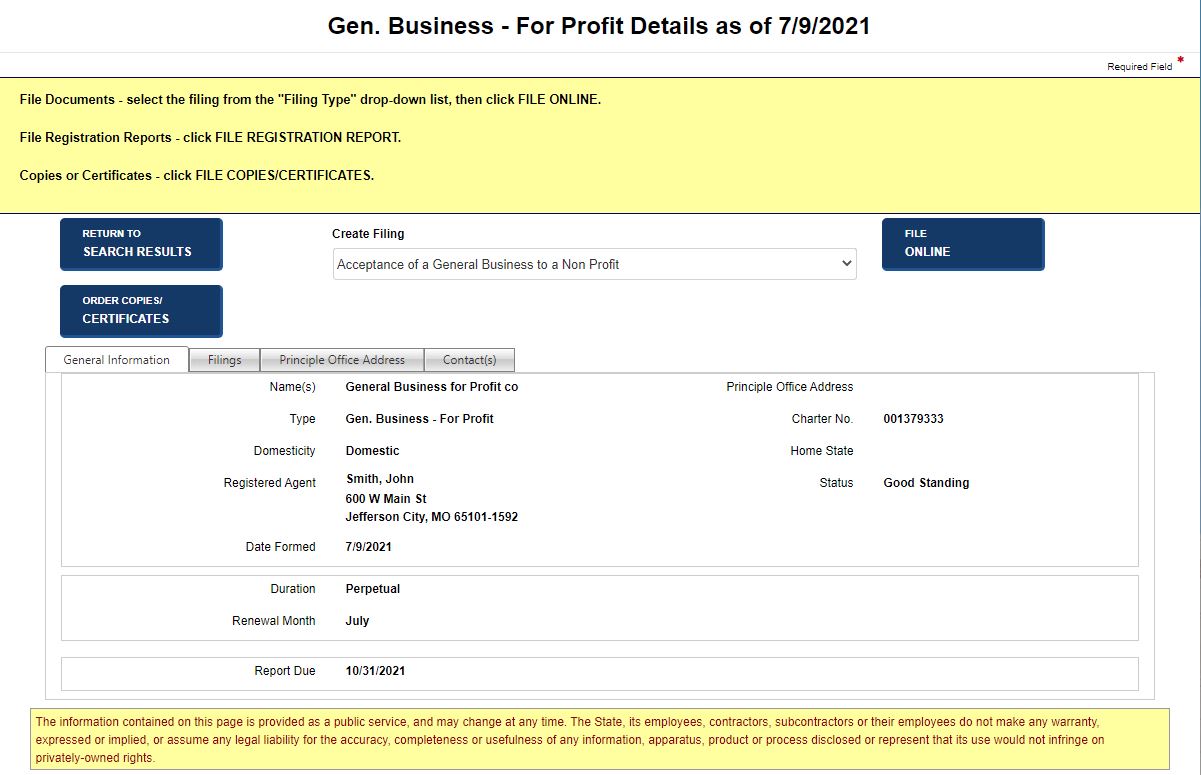
After performing a BE search or filing an amendment, details about the BE can be viewed. You can also order copies and certificates, initiate a BE filing, and file an annual (periodic) report. The tabs, fields and buttons that display are configured by your jurisdiction based on BE type and domesticity and may not reflect the images below.
How to use the BE details screen:
Navigate to the Details screen.
Select a tab to view specific information about the business entity. Tabs display based upon your jurisdiction's configuration.
To process a filing, select a Filing Type from the drop-down list and then select the File Online button. This button does not display if other filings are in process.
To file a registration report, select a Report Type from the drop-down list, and then select the File Reg. Report button. This button does not display if other filings are in process. Refer to Filing a Periodic Report for additional information.
To obtain copies and certificates, select the Order Copies/Certificates button to display the order copies/certificates screen.
To return to the search results table, select the Return to Search Results button. This button displays only if a search was performed.
How to view associated documents:
Perform Steps 1-2 above.
Select the Filings tab. The Filed Documents table displays, showing information about the BE's filings.

Related Information