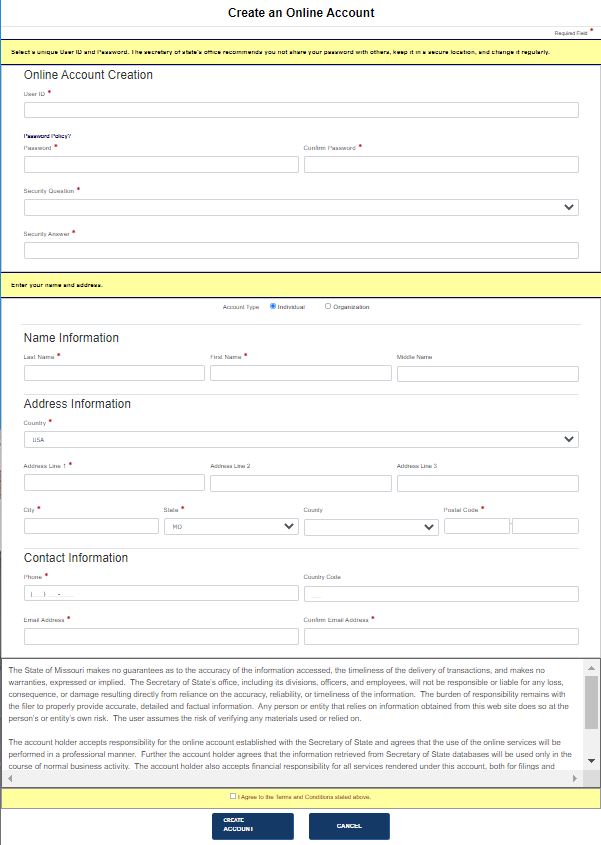
As an external user, you must create an online account in order to process your filings and requests. If the User ID field is not available during account setup, your email address will be User ID. Once your account is set up, a confirmation email containing account information is forwarded to the email address provided during account creation.
How to create an online account:
Select the Create Account link from the QuickLinkspane or directly below thelog in area. A screen similar to the one below displays:
Enter your Password. Confirm your password. If you have any questions about establishing a password, select the Password Policy? link.
Select a Security Question from the drop-down list and provide a Security Answer to the question you selected.
In the second section:
Select Individual or Organization. The applicable text fields refresh to reflect your selection.
Enter Last Name , First Name and Middle Name (Individual) or Name (Organization).
Select a Country from the drop-down list; default is USA.
Enter address details: Address Lines 1-3, City , State, County, Postal Code .
Enter your Phone number in the format (111) 222-3333.
If your country is not USA, you may need to enter a Country Code.
Enter your Email Address , in the format [email protected]. Email address is restricted <100 characters.
Read the Terms and Conditions agreement (if shown) and then select the check box. Your jurisdiction configures its own terms and conditions.
Select one of the following options:
Create Account
If all required information has been entered, is accurate and valid, an email is forwarded to you containing your User ID. You will be redirected to the log in screen where you can log in with your new credentials. If you do not select the Terms and Conditions check box, an error message displays. Continue from Step 4.
Cancel
A message displays alerting you that all information entered will be discarded; select OK to confirm and close the message. You will be redirected to the log in screen.
Related Information