
When processing a filing, you can attach documentation by performing a search and uploading your selected documents. These documents become part of your online filing. For Filed documents the upload file format is TIFF / TIF only. For Supporting documents, upload file format is PDF/TIFF/TIF only. Supporting documents may be uploaded during merger and consolidation filings.
How to attach documents:
Navigate to the
appropriate filing screen (refer to Creating
a Corporation, Filing a Fictitious
Name, Filing a Name Reservation,
or Filing
an Amendment, for example
Enter the applicable information for the filing type.
Select the Browse button to search for your documents.
File types and maximum document size are configured by your jurisdiction. If your document is not in the correct file type or its size exceeds the maximum size allowed, an error message displays.
Select your document. The file name automatically populates in the text field.
Select the Upload button to add the document. The file name appears as a link and no longer displays in the text field. One or more documents can be uploaded.
How to view the uploaded document:
Select the document link to open the document.
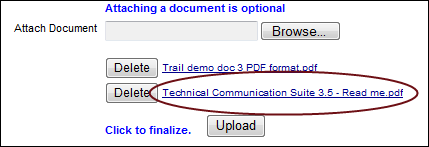
The document displays in a separate window.
How to delete an uploaded document:
Select the Delete button adjacent to the document you wish to delete. The document is deleted.
Related Information